How to Photograph Milky Way?
As an Amazon Associate, I earn from qualifying purchases.
How to Photograph Milky Way?
Photographing the Milky Way is one of the most exciting forms of landscape photography. With the right equipment, camera settings, and planning, you can capture incredible images of our galaxy stretching across the night sky.
The best part? You don’t need an expensive professional camera or a telescope to get started.
Table of Contents
What do you need to photograph the Milky Way?
The Milky Way is visible to the naked eye under sufficiently dark skies, but a camera can reveal much more detail than our eyes can see.
A long exposure collects light over several seconds, making faint stars and the galaxy’s dusty structure much more noticeable.
Essential photography equipment
| Equipment | Recommendation | Importance |
|---|---|---|
| Camera | DSLR or mirrorless with manual controls | Essential |
| Lens | Wide-angle, 14–24mm, preferably f/2.8 or faster | Highly recommended |
| Tripod | Sturdy, stable tripod | Essential |
| Remote shutter | Remote release or 2-second timer | Helpful |
| Spare battery | Fully charged extra battery | Recommended |
| Headlamp | Red-light mode preferred | Recommended |
| Star tracker | Motorized equatorial tracker | Optional |
Our review: The most useful combination for beginners is a camera with good low-light performance, a fast wide-angle lens, and a sturdy tripod. A star tracker can improve sky detail significantly, but it isn’t necessary for your first Milky Way photographs.
Best camera settings for Milky Way photography
Recommended beginner settings
Starting preset
Camera mode
- Manual (M)
Aperture
- f/2.8
Shutter speed
- 15 seconds
ISO
- 3200
White balance
- 4000 K
Focus
- Manual • stars
File format
- RAW
Self-timer
- 2 seconds
These settings work as an initial test for many full-frame cameras with a wide-angle lens. Adjust the shutter speed for your focal length and sensor, and check the stars at 100% magnification for trailing.
Aperture: f/1.4 to f/2.8
A wide aperture allows more light to reach your camera sensor. This is particularly important because the Milky Way is relatively faint.
- f/1.4 – Excellent for collecting light.
- f/1.8 – Great balance of brightness and practicality.
- f/2.8 – Very good for most Milky Way photography.
- f/4 – Usable with higher ISO, stacking, or longer tracked exposures.
Aperture also affects sharpness. Some lenses produce distorted stars in the corners when used fully open, so stopping down slightly may improve your results.
ISO: 1600 to 6400
ISO controls the camera’s signal amplification and affects how bright the recorded image appears.
ISO 3200 is a useful starting point for dark-sky photography. Increase to ISO 6400 if the image is too dark and your camera handles high ISO well.
Higher ISO does not itself collect more light, and it cannot compensate for an inadequate exposure without trade-offs.
Shutter speed: typically 10 to 20 seconds
Long exposures gather more light, but stars appear to move because Earth rotates.
Too long an exposure causes stars to look like small streaks instead of sharp points.
Nikon’s published examples include Milky Way photographs taken at 15 seconds, f/1.8, ISO 5000, and 25 seconds, f/4, ISO 10000, demonstrating how settings can vary with equipment.
When is the best time to photograph the Milky Way?
Timing plays an enormous role in successful Milky Way photography.
Although parts of the Milky Way are visible throughout the year, the brightest galactic core has a limited nighttime visibility season depending on your latitude.
Typical Northern Hemisphere viewing season
Mar–Apr
Before sunrise
May–Jun
Late night
Jul–Aug
Evening to night
Sep–Oct
Early evening
For much of the Northern Hemisphere, late spring through summer offers the most convenient opportunities to photograph the core. In the Southern Hemisphere, the core rises higher and is often particularly photogenic during the southern autumn and winter.
Exact visibility depends on geographic latitude, date, and time.
- Choose a night near the new moon
Moonlight brightens the sky and reduces the contrast of faint galactic details.
For the darkest photographs, aim for a clear night near the new moon, preferably when the Moon is below the horizon.
- Find a location without light pollution
Use a light pollution map to locate dark areas away from streetlights and large cities.
The Bortle Scale rates sky darkness from Class 1 to Class 9.
| Bortle class | Sky conditions | Milky Way photography |
|---|---|---|
| 1–2 | Extremely dark | Outstanding |
| 3–4 | Rural skies | Very good |
| 5–6 | Suburban | Difficult, but possible |
| 7–9 | Urban | Poor for detailed Milky Way images |
- Check the weather
Clear, transparent skies are important. Thin clouds, haze, humidity, wildfire smoke, and airborne dust can all hide galactic detail.
Don’t rely only on the general weather forecast. Check hourly cloud coverage and atmospheric conditions before traveling.
How to focus your camera on the Milky Way
Accurate focusing is one of the most challenging parts of night photography. Even a tiny focusing error can turn sharp stars into blurry circles.

Follow this focusing method:
- Switch your lens to manual focus (MF).
- Point the camera toward a bright star or distant planet.
- Activate Live View on your camera.
- Magnify the display by 5× or 10×.
- Rotate the focusing ring until the star looks as small and sharp as possible.
- Capture a test photograph and inspect the stars at full magnification.
Important: Do not assume that turning the lens all the way to the infinity symbol gives accurate focus. Some lenses focus beyond infinity.
Once you’ve achieved perfect focus, avoid touching the focusing ring.
Step-by-step: How to photograph the Milky Way

Step 1: Find your composition
Arrive before dark. Position your tripod where you can include mountains, trees, water, or another interesting foreground element. Use a sky-planning app to predict the galaxy’s position.

Step 2: Set up your camera
Mount your camera securely. Choose Manual mode, RAW format, a wide aperture, ISO 3200, and an appropriate shutter speed. Disable flash and turn off tripod-incompatible stabilization modes.

Step 3: Focus and take a test shot
Focus manually on a bright star. Use a 2-second timer to minimize vibration. Check the image for sharp stars, correct exposure, and unwanted light pollution.

Step 4: Capture multiple images
Take 10–20 consecutive photographs with identical settings. These can be stacked later to reduce image noise while preserving more detail in the night sky.
How to photograph the Milky Way with a smartphone
Modern smartphones can photograph stars and sometimes the Milky Way, especially under very dark skies.


For the best results, mount your phone on a tripod, use its longest available Night mode exposure or a suitable manual camera app, and capture photos in RAW where supported.
On compatible iPhones, Night mode may permit exposures of up to 30 seconds when the phone is stable. Some Android phones have dedicated astrophotography modes that automatically combine multiple exposures.
A smartphone can produce attractive wide night-sky images, but a large-sensor camera with a fast lens generally delivers better fine detail and cleaner high-resolution results.
Best apps for planning Milky Way photography

PhotoPills
Best overall planning tool. Predicts the location of the galactic core, Moon position, and other important astronomical information.
Best for: detailed compositions and scheduling.

Stellarium
An interactive planetarium that displays the night sky for different dates and locations.
Best for: identifying stars and finding the Milky Way.

Light Pollution Map
Helps identify dark areas with potentially better sky visibility.
Best for: finding photography locations away from cities.
PhotoPills is my top recommendation for photographers planning a specific shot because it combines astronomical predictions with composition tools. Stellarium is an excellent starting point for learning the sky.
How to edit Milky Way photos
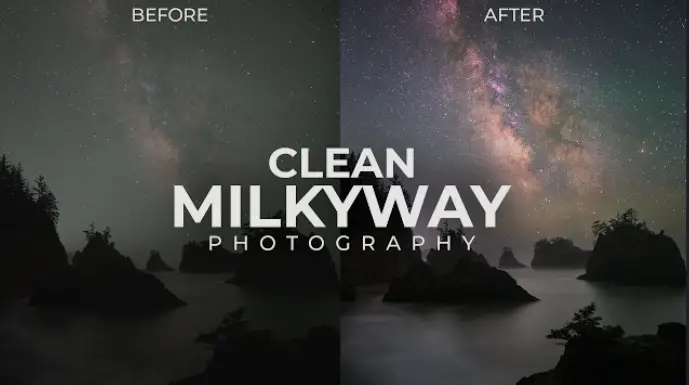
Capturing the image is only half the process. Editing brings out the faint details, subtle colors, and contrast of the galaxy.

Natural, lower-contrast appearance

Enhanced color and contrastIllustrative examples of subdued versus more heavily processed astrophotography, not an actual before-and-after pair.
Recommended Lightroom adjustments
Illustrative starting adjustments; the best values depend on your RAW file.
| Adjustment | Suggested starting range |
|---|---|
| Exposure | +0.2 to +0.7 |
| Contrast | +10 to +25 |
| Highlights | −20 to −50 |
| Shadows | +10 to +35 |
| Whites | +10 to +25 |
| Blacks | −10 to −30 |
| Texture | +5 to +20 |
| Clarity | +5 to +15 |
| Dehaze | +5 to +20 |
These aren’t universal presets. Excessive clarity, dehaze, saturation, or sharpening can introduce artifacts and make stars appear unnatural.
Advanced technique: image stacking
Stacking multiple sky exposures improves the signal-to-noise ratio.
Programs such as Sequator, Siril, and Starry Landscape Stacker can align the stars across different frames and help reduce noise.
For a detailed foreground, you can capture a separate longer exposure or photograph it during blue hour, then blend it with your properly exposed night sky.
If the foreground and sky are captured at different times, be transparent about that when presenting the image as a documentary photograph.
Common Milky Way photography mistakes
| Mistake | Why it happens | How to fix it |
|---|---|---|
| Blurry stars | Poor manual focus | Magnify a bright star and refocus |
| Star trails | Exposure is too long | Reduce shutter speed |
| Grainy photographs | Weak signal or underexposure | Use a faster lens or stack frames |
| Washed-out sky | Moonlight or urban light pollution | Shoot on dark, moonless nights |
| Orange sky | Light pollution or white balance | Find darker skies and adjust RAW white balance |
| Dark foreground | Insufficient foreground light | Capture a separate foreground exposure |
| Distorted corner stars | Lens aberrations | Stop down slightly or try another lens |
One of the biggest beginner mistakes is assuming that increasing ISO will automatically produce better astrophotography. Finding darker skies and gathering more actual light are usually more effective improvements.
Best techniques for advanced Milky Way photographs

Milky Way panoramas
Capture several overlapping vertical images and stitch them into a wide panorama. This works particularly well when photographing the entire galactic arch.

Star tracker photography
A star tracker rotates the camera to compensate for Earth’s rotation. This enables longer sky exposures with sharper stars, although the foreground will blur unless captured separately.

Reflections and landscape compositions
Lakes, rock formations, and isolated trees can create dramatic foregrounds. Keep the composition simple and let the Milky Way remain the main subject.
Milky Way photography: Final review
Difficulty for beginners
Moderate
| Equipment cost | Low if you already own a manual camera and tripod |
| Learning curve | Moderate |
| Best improvement | Dark skies and accurate focus |
| Best beginner lens | Fast wide-angle, f/2.8 or faster |
| Editing importance | High for detailed results |
Milky Way photography is incredibly rewarding because it combines photography, astronomy, and landscape exploration.
You don’t need the newest camera to produce beautiful results. A reliable tripod, a reasonably fast lens, good planning, and careful focusing are often more important than expensive equipment.
For a first attempt, use a 20mm full-frame lens, f/2.8, ISO 3200, and a shutter speed around 10–15 seconds. Photograph under clear, moonless skies away from cities, then adjust after inspecting your test shots.
READ ALSO: Night flash photography